You open Ahrefs and see 12,000 backlinks. That sounds great. Then you look one column over and see 140 referring domains. And suddenly you’re not sure if your link profile is strong, weak, or quietly broken.
It’s a really common moment. Most SEO tools put the two numbers side by side, but few explain why they’re so different or which one you should actually care about.
Here’s what you need to know: backlinks count every link, while referring domains count every site. The gap between the two tells you a lot about your site, if you know how to read it.
Quick answer
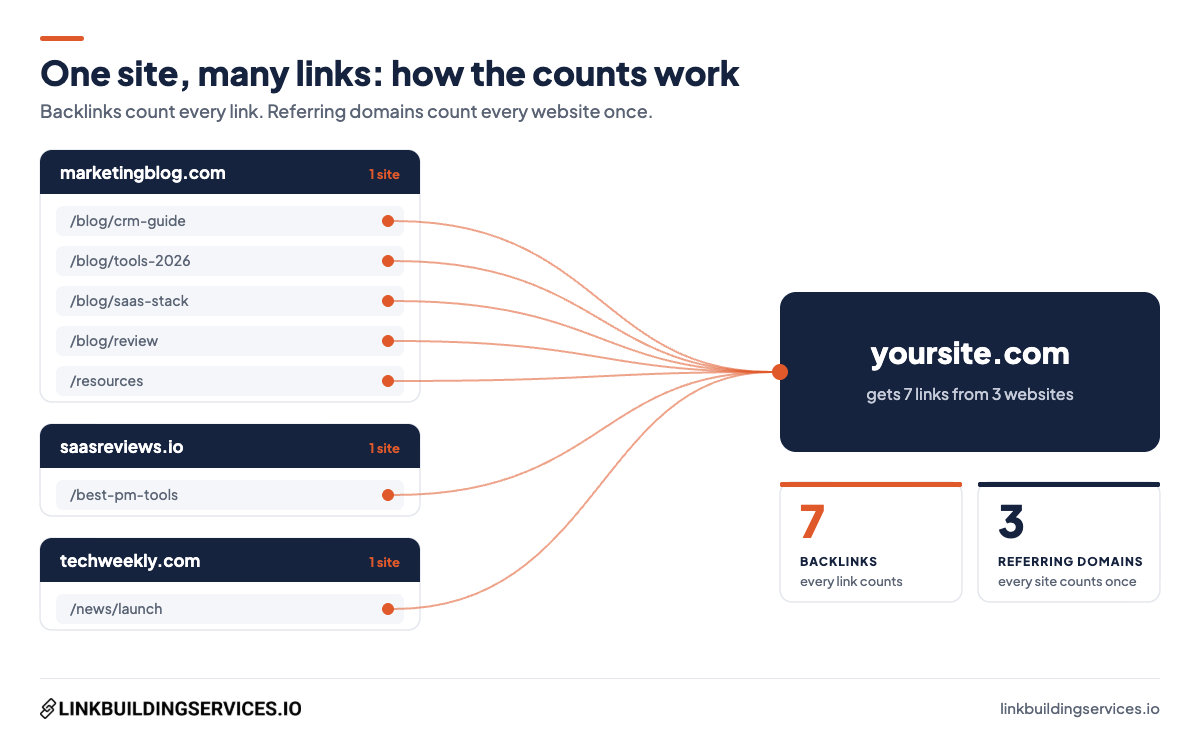
A backlink is a single link from another website to yours. A referring domain is a unique website that links to you, however many times. So if one site links to you from 5 different pages, that’s 5 backlinks but only 1 referring domain. For rankings, the number of quality referring domains usually matters more.
In This Article
What Backlinks and Referring Domains Actually Are
What is a backlink?
A backlink is a link on another website that points to a page on your site. Each individual link counts as one backlink.
For instance, say a marketing blog writes a review of your project management tool and links to your pricing page. That’s one backlink. If the same blog then mentions you in four more articles, each with a link, you now have five backlinks from that blog.
What is a referring domain in SEO?
A referring domain is a website that links to you at least once. It doesn’t matter if that site links to you once or 500 times. It still counts as one referring domain.
So in the example above, the marketing blog gives you five backlinks but just one referring domain. As Ahrefs explains in its guide to backlink metrics, referring domains only count one link per website.
Referring Domains vs Backlinks Compared
Here’s the side-by-side view. Both numbers come from the same links. They simply count them in different ways.
| Backlinks | Referring domains | |
|---|---|---|
| What it counts | Every individual link to your site | Every unique website that links to you |
| Example | 1 site linking 5 times = 5 backlinks | 1 site linking 5 times = 1 referring domain |
| What it signals | How often you’re linked | How many different sites vouch for you |
| Easy to inflate? | Yes. One sitewide footer link can add thousands | Harder. Each one needs a separate website |
| Effect on rankings | Extra links from the same site add less and less | New quality domains tend to add more weight |
| Where to check | Search Console (Links report), Ahrefs, Semrush, Moz | Search Console (Top linking sites), Ahrefs, Semrush, Moz |
Which One Matters More?
In practice, referring domains matter more. And it’s not hard to see why.
Think of each referring domain as a separate vote of confidence. Ten different industry sites recommending you is genuinely more convincing than one site recommending you ten times. Search engines see it the same way. Ahrefs, for example, doesn’t count extra links from the same website when it calculates Domain Rating.
But that doesn’t mean extra links from the same site are worthless. A second or third link from one domain can still help when:
- It points to a different page. A link to your homepage and a link to a feature page help two different pages rank.
- It uses different anchor text. Varied, natural anchors help search engines understand what each page is about.
- It sends real visitors. A link inside a popular guide can bring you customers, whatever it does for SEO.
So the goal isn’t to avoid repeat links. It’s to make sure your growth comes mostly from new, relevant sites, not from piling more links onto the same few.
To give you a concrete example, at Link Building Services IO, we don’t simply report a client’s total backlink count each month. We track new referring domains, check each one for real traffic and topical fit, and flag any site that links to a client hundreds of times, so that clients can see their authority truly growing, not just a number going up.
What Your Backlink-to-Referring-Domain Ratio Says About Your Site
Divide your backlinks by your referring domains and you get your ratio. If you have 3,000 backlinks from 600 referring domains, your ratio is 5:1. On average, each site links to you five times.
This is where most guides go vague. Honestly, there’s no official “healthy” ratio. Google doesn’t publish one, and we haven’t found a study that sets a reliable benchmark. So treat the ranges below as our working rule of thumb, not an industry standard.
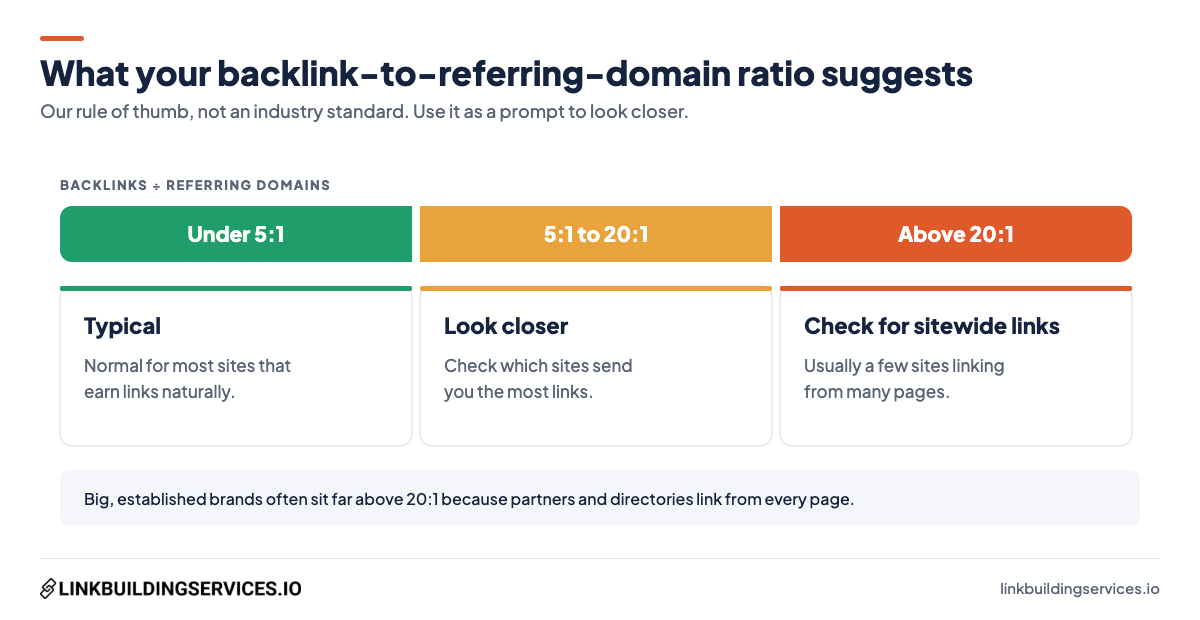
- Under 5:1 is typical for most small and mid-size sites that earn links naturally.
- 5:1 to 20:1 is worth a closer look. Check which sites send you the most links and whether those links make sense.
- Above 20:1 usually means a few sites link from many pages. That’s often a sitewide footer, sidebar or blogroll link.
A high ratio isn’t automatically bad, though. Big, established sites often run far above 20:1 because partners, directories and their own network sites link to them from every page. For instance, AIOSEO’s own article on this topic showed 478k backlinks from 7.35k referring domains in Ahrefs, a ratio of roughly 65:1, and that’s a well-known, legitimate brand.
The ratio is a prompt to look closer, not a verdict. Here’s the most common reason it jumps.
How one sitewide link inflates your count
Say a partner adds “Built by YourAgency” to their website footer. If their site has 2,000 pages, most tools will show 2,000 new backlinks overnight. But you’ve gained exactly one referring domain.
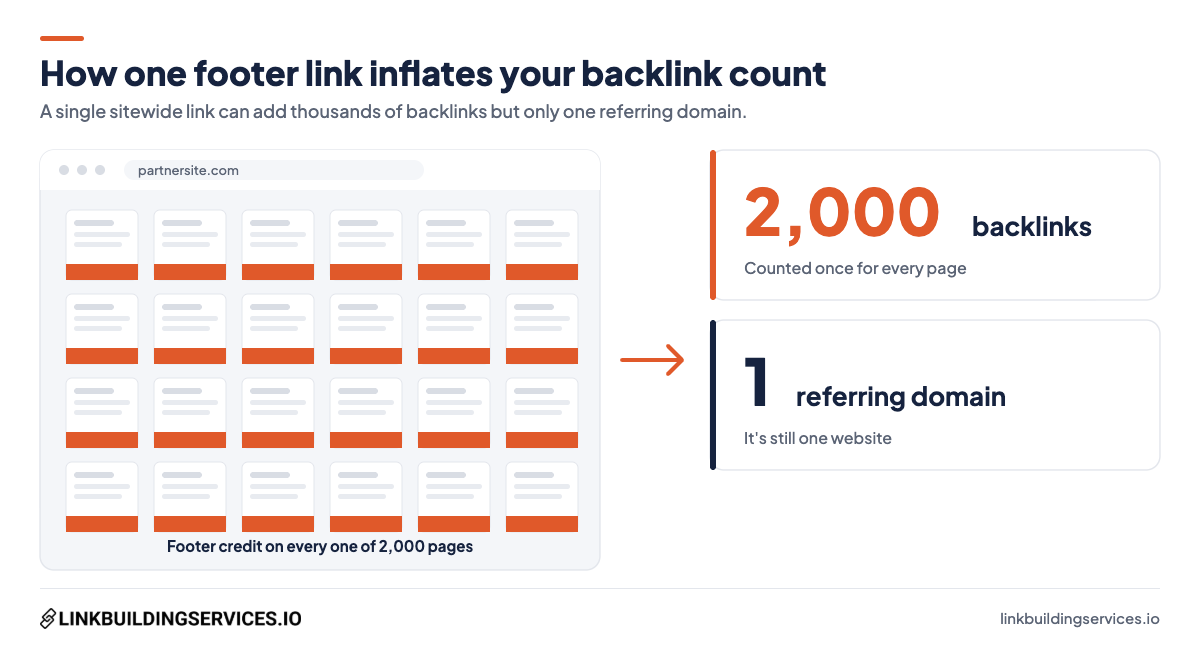
One footer credit from a genuine partner is normal. The problem starts when footer, sidebar or template links are placed on many sites to boost rankings. Google’s spam policies list widely distributed links in the footers or templates of various sites as an example of link spam.
Red flags in your ratio
You have to look past the totals when you see:
- One domain sending a big share of all your backlinks, especially a site you don’t recognize
- Sudden spikes of thousands of backlinks with almost no new referring domains
- Exact-match keyword anchors repeated across footer or sidebar links
- Links from networks of similar-looking sites that all link to each other, a common sign of a private blog network (PBN)
If you find links you didn’t build and don’t want, Google says it typically ignores links from known spam sites. You can still remove or disavow them if you’re worried.
Free Backlink-to-Referring-Domain Ratio Checker
Paste your two numbers from Ahrefs, Semrush, Moz or Search Console. Use numbers from the same tool so that you’re comparing like with like.
Ratio checker
Why Ahrefs, Semrush, Moz and Search Console Show Different Numbers
Run your site through three tools and you’ll get three different answers. That’s normal. None of them is “wrong”. They simply see different slices of the web.
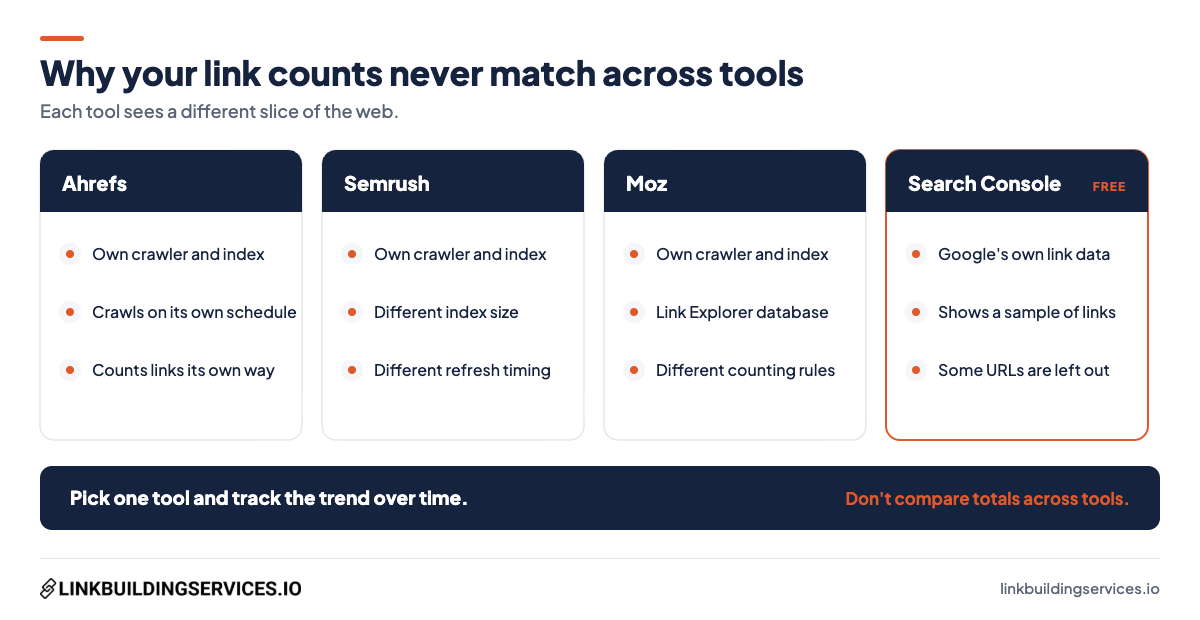
- Each tool runs its own crawler. Ahrefs, Semrush and Moz crawl the web on their own schedules and store what they find in their own indexes. None of them can see Google’s link data.
- They count differently. Tools treat lost links, redirects, subdomains and nofollow links in slightly different ways, and they keep old links in the count for different lengths of time. Ahrefs has a good write-up on why backlink counts can’t be compared across tools.
- Search Console only shows a sample. Google’s Links report shows a sample of links, not every link Google knows about, and some URLs are left out.
So pick one tool and stick with it for tracking. Watching the trend in one tool is far more useful than comparing totals across three. If links you expect aren’t appearing, see our guide on backlinks not showing up in Ahrefs.
How to Check Your Backlinks and Referring Domains
In Google Search Console (free)
- Open your property and click Links in the left menu.
- Under External links, the total shows your backlink count as Google reports it.
- Open Top linking sites and click More. That list is effectively your referring domains, sorted by how many links each site sends you.
- Click any site to see which of your pages it links to. This is the quickest way to spot a sitewide link.
- Use Export external links to download latest links or a larger sample for review.
In Ahrefs (paid)
- Enter your domain in Site Explorer. The overview shows backlinks and referring domains side by side.
- Open the Referring domains report and sort by the links-to-target column to find sites that link to you many times.
- Filter by Dofollow and look at the Domain Rating and traffic of each site, not just the count.
- Check the New and Lost tabs monthly so that you catch sudden spikes or drops early.
Semrush and Moz work in much the same way. You can use whichever tool you already pay for.
Do Backlinks Still Matter in 2026?
Yes, but less than many people think. Google’s Gary Illyes has said links aren’t in the top three ranking factors anymore, and in 2024 he said Google needs very few links to rank pages. Google also removed the word “important” when describing links in its documentation.
So, given that Google needs fewer links than it used to, the links you do earn have to count. A handful of relevant referring domains will do more for you than thousands of repeat links from a few sites. That’s also why we wrote a full guide on how many backlinks you need.
The Bottom Line
Backlinks count links. Referring domains count the sites behind them. When you’re judging a link profile, start with referring domains, then use the ratio between the two to spot sitewide links and anything that looks like a scheme.
And when you plan link building, aim for new, relevant sites rather than more links from the same ones. That’s what truly moves rankings.
Done for you
Grow referring domains, not just link counts
Every placement is a new, vetted website, so your authority grows the way search engines actually measure it:
- DR30–DR70 sites with 1,000+ organic sessions – checked for relevance and indexation
- In-content, editorial placements – no sitewide, footer or network links
- 6-month replacement guarantee – removed or deindexed links replaced free
See our link building packages →
Want to learn more first? Read our guides to natural backlinks and niche-relevant backlinks.
Written By

Reviewed By

Sef Gojo Cruz
COO at SharpRocket, overseeing end-to-end operations, from crafting link building strategies to leading high-performing teams. Previously led SEO initiatives at Workhouse, a digital agency in Australia, and Keymedia, a real estate media company based in New Zealand.