Most link building campaigns don’t fail at your pitch – they fail before you do any outreach, when someone simply adds a blog to the outreach list without doing QA on it. That’s why knowing how to analyze blogger for link building and outreach strategies matters before you send a single email.
Learning how to analyze a blogger is the most underrated skill in link building outreach. A few minutes of vetting will tell you whether a website will pass real value, whether its audience actually fits yours, and what kind of pitch is most likely to land.
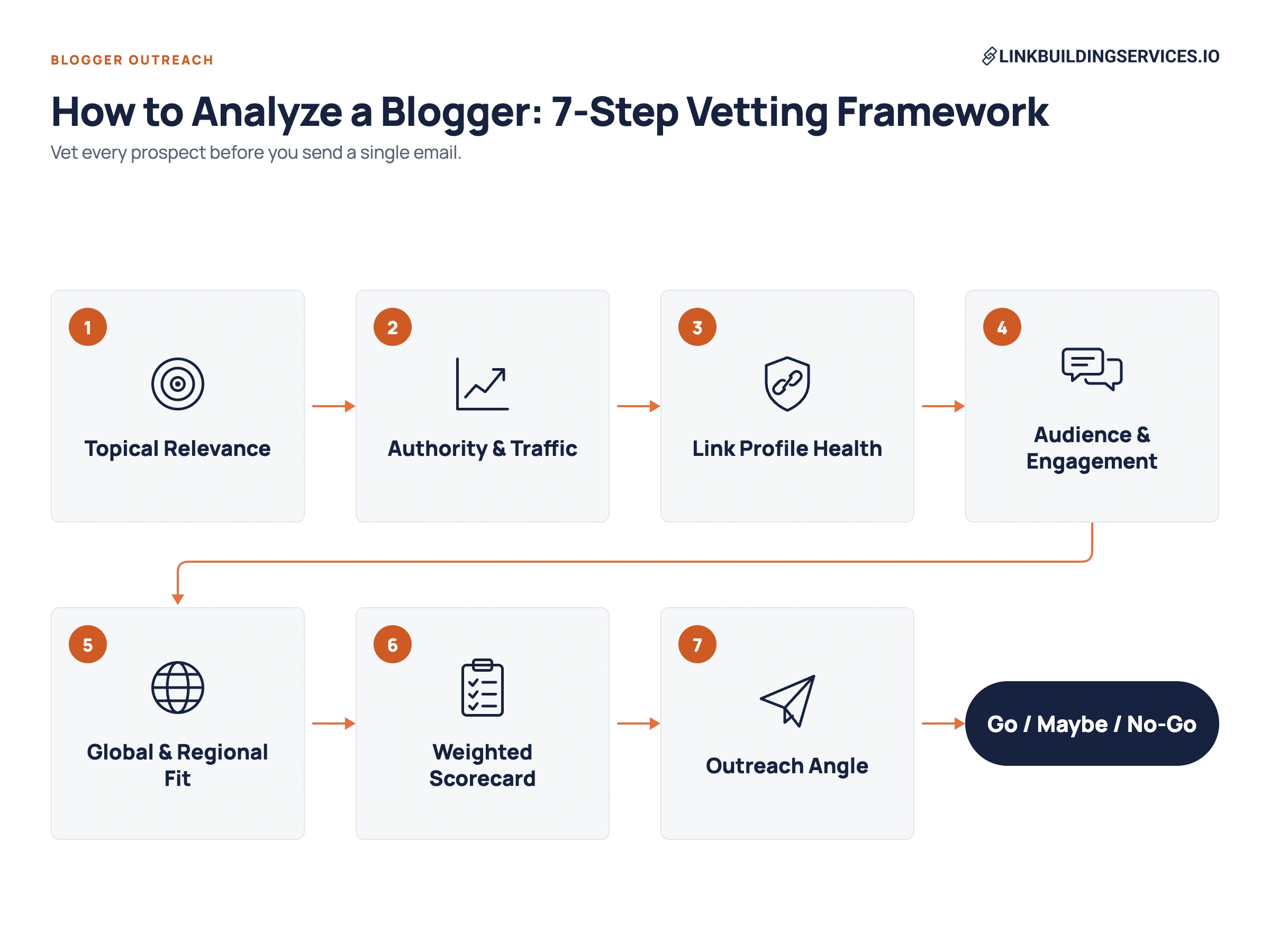
In this guide, we walk you through a 7-step framework for vetting any blogger. You’ll learn which link metrics matter in 2026 and how to score each prospect with a simple go/no-go scorecard, which you can download for free.
In This Article
- What Does “Analyzing a Blogger” Mean?
- Step 1: Check Topical Relevance
- Step 2: Assess Authority and Organic Traffic
- Step 3: Audit Link Profile Health
- Step 4: Evaluate Audience and Engagement
- Step 5: Run Global and Regional Checks
- Step 6: Score the Blogger with a Weighted Scorecard
- Step 7: Turn Your Analysis into an Outreach Angle
- Tools for Analyzing Bloggers
- After the Link Goes Live: Keep Checking
- Common Mistakes When Vetting Bloggers
What Does “Analyzing a Blogger” Mean?
Analyzing a blogger means checking whether a website and the person behind it are worth your outreach effort before you actually send a single email. You’re answering one question: Will a link, mention, or partnership with this blog actually help you?
It usually sits between two other stages of link building:
- Prospecting – finding a list of potential blogs, often by checking which sites already link to your rivals (see steal your competitors backlinks).
- Analysis – vetting each blog on that list.
- Outreach – contacting the ones that pass.
When to Analyze a Blogger?
You vet every prospect before you:
- Pitch a guest post – your content and byline will live on their website.
- Request a link insertion or resource mention – the linking page needs real traffic and topical relevance to pass link juice and value. If you’re deciding between the two formats, see guest posting vs niche edits.
- Agree to a paid or sponsored placement – this carries the most risk and deserves the closest look. Our guide to the best places to buy backlinks covers where these placements usually come from.
- Start a long-term partnership – link acquisition campaigns like co-marketing, digital PR, or recurring contributions.
What You Need Before You Start?
Decide three things up front so you can judge every blog against the same standard:
- Your target topic – the niche or subtopics a blog must cover to count as relevant.
- Your target market – US, a specific country, or global (depending on your ICP).
- Your link goal – rankings, referral traffic, brand exposure, or all three.
 With those set, you’re ready for Step 1.
Step 1: Check Topical Relevance
Topical relevance is the first filter, as nothing else makes up for it. For instance, a backlink from a smaller blog in your niche is usually worth more than one from a high-authority site that has nothing to do with your topic. That’s the core idea behind niche relevant backlinks.
It sends better-fit readers, and it genuinely carries more weight with Google.
SEO expert Cyrus Shepard makes this point in his guide How To Create Links for SEO Google Can’t Ignore (Zyppy, October 2026). He explains that Google gives more weight to backlinks that show relevance, come from trusted sources, add new information, and result from independent editorial choices.
He also argues that every link needs a “tight topical relationship flow” between three parts:
- Source page (the blog post linking to you)
- Anchor text and the words around it
- Target page (your page)
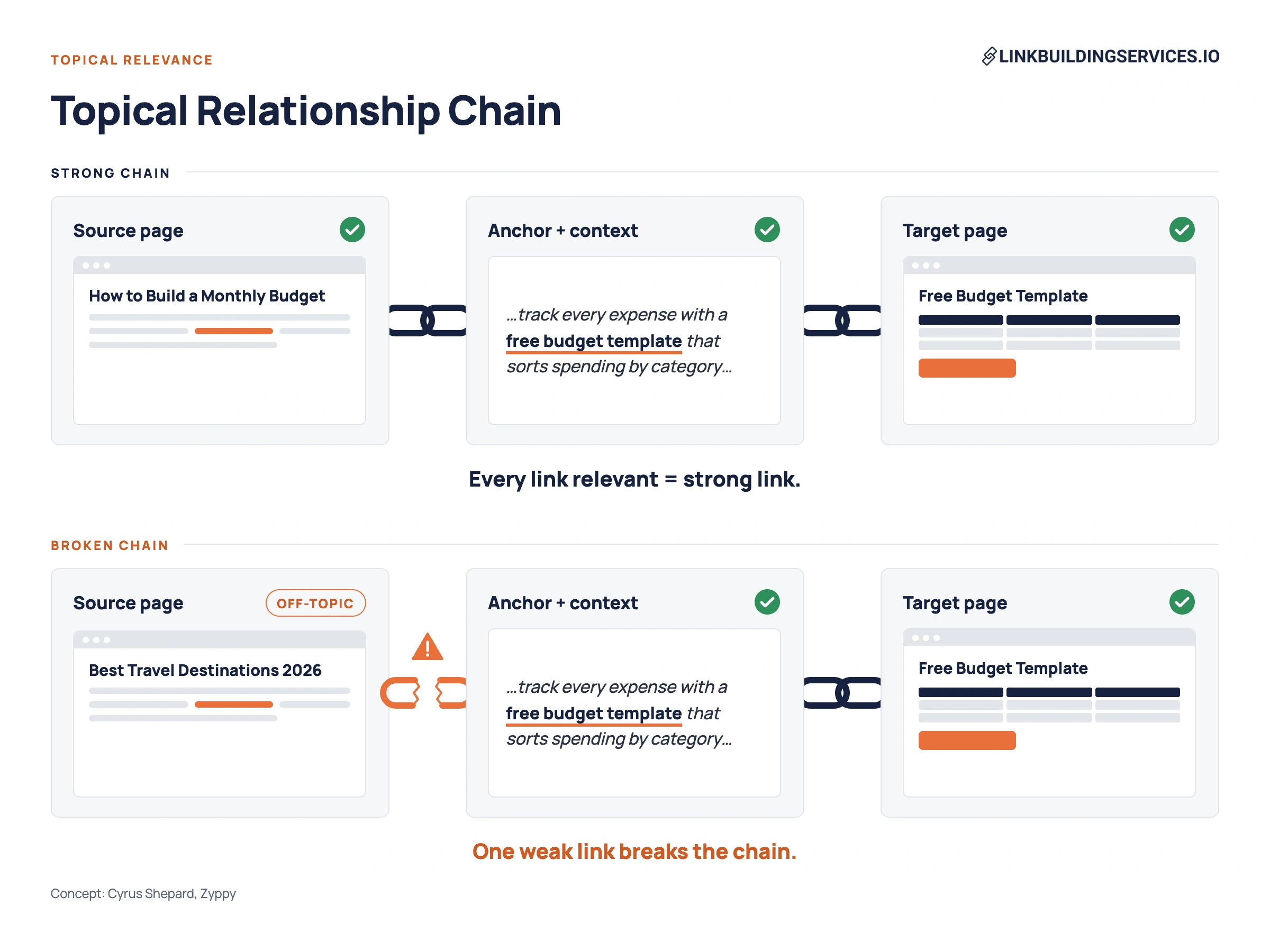 If any one of these isn’t relevant, the chain weakens, and so does the link. So when you analyze a blogger, you’re not only asking “Is this site about my topic?” You’re also asking, “Could this site link to me in a way that makes topical sense?”
Topic Match
Start with the blog’s main navigation and category pages. Ask:
- Do the core categories line up with your niche?
- Would your content feel natural alongside their existing posts?
- Is the blog written for the same audience you serve?
For instance, a personal finance blog is a strong fit for a budgeting app, while a general “lifestyle” blog that covers finance once a year is not.
Page-Level Relevance: Where Would Your Link Actually Go?
Sitewide relevance isn’t enough. You need to find the specific posts where a backlink to you would naturally fit, and check:
- Is the post closely related to your target page? A blog post on “how to build a monthly budget” linking to a budgeting tool makes sense, but a post on “best travel destinations” doesn’t.
- Is there room for rich context? Cyrus notes that Google can use the words before and after a link to understand its context. So a link inside a relevant paragraph beats a bare mention with no surrounding text.
- Would the link sit in the main content? Links high in the article body carry more weight than links in sidebars, footers, or author boxes.
If you can’t picture at least two or three posts where your link belongs, the blog is a weak fit.
Topical Drift
Some blogs start focused, then gradually expand into whatever topics pay. Scroll through the last 20 to 30 posts and watch for sudden shifts into unrelated, high-margin niches such as:
- Casino and betting
- CBD and supplements
- Crypto and forex
- Essay writing or “best VPN” roundups
Drift matters beyond just looking spammy. Cyrus explains that Google keeps a long memory of what pages and sites used to be about, and when that focus changes, older links can lose relevance.
For example, a blog that has drifted far from its original topic may pass less topical value than its history suggests, and that value may keep shrinking.
A few off-topic posts aren’t a dealbreaker, but a recent archive dominated by them usually means the site now exists to sell links.
Content Quality
Read two or three recent posts in full. Look for:
- Depth – real explanations, examples, or data, not 600-word filler.
- Original insight – first-hand experience, opinions, or testing.
- Clear authorship – named authors with bios, a real About page, and contact details.
- Editorial care – clean formatting, accurate facts, and few obvious errors.
Quality is also a sign of independent editorial judgment, one of the signals Cyrus says Google rewards. A blog that clearly chooses what it publishes and links to is worth more than one that accepts any post.
Posting Frequency
Check the dates on the latest posts. A blog that has published within the last 30 to 90 days is active and more likely to reply. However, if the newest post is more than six months old, the site may be abandoned, and your outreach email will likely go unanswered.
Quick Test: Use a Site Search
Run a Google search for:
site:domain.com [your topic]
Several relevant, well-written results mean the blog genuinely covers your niche, and they show you exactly which pages could host your link. Zero or one result means the fit is weaker than their homepage suggests.
Step 2: Assess Authority and Organic Traffic
Once a blog passes the relevance check, the next question is whether it has real authority and an actual audience. This separates websites that Google trusts from sites that only look strong on paper.
Authority matters more than many link builders assume. In the same guide, Cyrus explains that Google appears to treat its most trusted, highest-PageRank links very differently from everything else, rather than on a smooth scale.
He also suggests that one backlink from a highly trusted source can lift the value of weaker links with similar anchor text – one great backlink can be worth more than a large pile of average ones. That’s what makes powerful backlinks worth the extra effort.
The catch is that third-party authority scores don’t measure Google’s trust directly, so you need to look past any single number.
DR and DA as a Starting Filter
Domain Rating (Ahrefs) and Domain Authority (Moz) both estimate a website’s backlink strength. They’re useful for quickly sorting a long prospect list, but they have limits:
- They’re calculated by tools – not by Google.
- They can be inflated with low-quality or manipulated links.
- They can swing sharply from small changes in a site’s link profile (see ahrefs dr dropped due to losing one link).
- They say nothing about topical relevance, traffic, or audience.
Set a minimum that suits your niche, then use DR/DA only to decide which blogs deserve a closer look.
Organic Traffic and Keywords
Traffic is the best check on authority – based on our experience, too. A website Google trusts usually ranks for real keywords and earns real visits. In Ahrefs, Semrush, or Similarweb, check:
- Estimated monthly organic traffic
- Number of ranking keywords, especially in positions 1 to 10
- Relevance of those keywords to your topic
For example, a blog ranking for hundreds of keywords in your niche is a far stronger prospect than one with a higher DR but almost no rankings.
Traffic Trend Over 12 to 24 Months
Don’t judge a website by its current traffic alone. Open the traffic history chart and look at the shape:
- Steady or growing – usually healthy.
- Gradual decline – may reflect aging content or rising competition, so it’s worth a closer look.
- Sudden cliff – often lines up with a Google core update or spam update, and is a serious warning sign.
A backlink from a website that recently lost most of its traffic may carry far less value than its metrics suggest.
Top Pages
Check which pages drive the website’s traffic. You want traffic spread across several relevant posts. Be cautious if:
- One viral or off-topic page accounts for most visits.
- Top pages are unrelated to your niche.
- Pages you’d want a link from get little or no traffic.
Red Flag: High DR, Little or No Traffic
This is one of the most common footprints of a link-selling website. Strong authority with almost no organic traffic usually means the backlinks were built to raise the score – not earned through useful content. Many of these sites are listed on link building marketplaces, so vet marketplace inventory with extra care.
Step 3: Audit Link Profile Health
A blog can be relevant and have real traffic, yet still be a risky place to get a link. This step looks at the backlinks pointing to the site and the links going out of it, since both reveal whether Google is likely to trust what the site links to.
Cyrus explains that Google looks for signs of manipulation in link patterns and doesn’t simply flag links as on or off. It can discount them based on how likely they are to be manipulative. So a blog with a manipulated link profile may pass far less value than its metrics show, even if it’s never been penalized.
Referring Domains
It isn’t only how many sites link to a blog, but which ones and why. That’s the idea behind link popularity. In Ahrefs or Semrush, open the site’s referring domains report and check:
- Quality – are the linking sites real blogs, publications, and businesses, or low-quality directories and spam pages?
- Relevance – do the linking sites share the blog’s topic?
- Growth pattern – has the number of referring domains grown steadily over time?
Watch for sudden spikes, as Cyrus notes that Google can detect bursts of links built over a short period and discount them. A blog that gained hundreds of referring domains in one month, with no viral content to explain it, has likely bought or built them.
Anchor Text Patterns
Open the anchors report. Natural profiles are dominated by brand names, URLs, and descriptive phrases, so be cautious when you see:
- Many exact-match commercial anchors (“best SEO agency,” “cheap flights”).
- Clusters of near-identical keyword variations – the “deliberately different” anchor texts Cyrus warns Google can identify.
- Anchors in unrelated niches or languages.
The same rules apply to the links you build yourself. See link building best practices for anchor and placement guidelines that keep your own profile safe.
Outbound Links
What a website links to matters as much as who links to it. Review a sample of recent posts and the site’s linked-domains report:
- Outbound vs. inbound ratio – a website linking out to far more domains than link to it is often selling placements.
- Who they link to – mostly relevant, reputable sources are a good sign.
- Link placement – are outbound links woven into useful content, or dropped awkwardly into otherwise generic text?
Link-Seller Footprints
These signs suggest that a blog exists mainly to sell links:
- A “Write for us,” “Sponsored post,” or “Advertise” page with a price list
- Many guest posts by different authors on unrelated topics
- Nearly every recent article contains one or more commercial outbound links
- Phrases like “do-follow guaranteed” or “permanent link” in their offers
- Sitewide or footer links to unrelated sites
Prices far below the market rate are another warning sign. You can compare quotes against typical rates in how much do backlinks cost.
Cyrus also explains that repeated links, like sitewide, sidebar, widget, or templated links, may add little value, since Google values each link for the new information it adds.
He also notes that Google may keep only a limited number of anchors from any single domain. So if a blogger offers you a sitewide link, a single in-content link is usually the better deal.
Spam Signals
Finish with a quick risk check:
- Spam score in Moz or toxicity flags in Semrush.
- PBN patterns – shared themes, hosting, or ownership across sites linking to each other.
- Expired-domain history – check the Wayback Machine to see if the site was once something completely different.
Cyrus also notes that Google remembers what a website used to be, and that repurposed or expired domains can lose the value of their old links. If a blog fails this check, skip it. The short-term gain rarely outweighs the risk, as covered in our guide to ethical link building.
Step 4: Evaluate Audience and Engagement
Link metrics tell you how a blog performs in search, but engagement tells you whether real people actually read it. That matters for two reasons: an engaged audience sends referral traffic, and links that readers are likely to click tend to carry more weight.
Cyrus points to Google’s “Reasonable Surfer” patent, which describes valuing links by how likely someone is to click them.
Real Comments vs. Spam Comments
Scroll to the comments on a few recent posts. Healthy signs include:
- Comments that respond to specific points in the post
- Questions from readers and replies from the author
- Repeat commenters who seem to follow the blog
Warning signs include generic comments, comments stuffed with links, or no moderation at all. Many blogs have turned comments off, so don’t treat their absence as a red flag. Just look for engagement elsewhere.
Newsletter or Community Signals
Some of the most valuable bloggers we know have their strongest audience off their site. Check for:
- An active newsletter on Substack, Beehiiv, or a similar platform, ideally with visible subscriber counts or recent issues
- A Discord, Slack, or Facebook group tied to their blog
- Mentions of the blogger in podcasts, roundups, or other publications
These signs show a real, loyal audience and often a chance for bonus exposure beyond the backlink. Even mentions that stay unlinked carry weight, as covered in brand mentions for seo.
Audience Fit
Ask whether the blog’s readers are people you want to reach. Check who comments and shares, what problems they talk about, and whether the blog’s tone and level match your customers.
Step 5: Run Global and Regional Checks
A blog with strong metrics can still be a poor fit if its readers are in the wrong country, or a great fit for a regional campaign that a US-only check would miss. This step makes sure you’re reaching the market you actually want to rank in.
Traffic by Country
In Ahrefs, Semrush, or Similarweb, open the site’s traffic breakdown by country and check:
- Top country share – where does most of the traffic come from?
- Match with your market – if you sell to US customers, a blog with most of its traffic from another country adds limited referral value.
- Spread – traffic split across many unrelated countries, with no clear core market, can signal low-quality or artificial traffic.
For a US link acquisition campaign, look for publishers where the US is the leading traffic source. For a global campaign, look for a spread that matches the regions you serve.
Language and ccTLD Relevance
A website’s domain and language tell you which market search engines associate it with:
- ccTLDs such as .co.uk, .com.au, .ca, or .de are strongly tied to their country.
- Generic domains (.com, .net, .org) can serve any market, so rely on the traffic data.
- Language should match the content you’re promoting. A backlink from a Spanish-language blog to an English-only page gives readers a broken experience and a weaker topical connection.
If the blog publishes in several languages, check for separate language sections or hreflang tags, and aim for a backlink from the version that matches your target page.
Local Relevance for Regional SEO
For local or regional link building campaigns, relevance goes beyond topic. Look for:
- Coverage of local events, places, or issues.
- Mentions of cities or regions you serve.
- Links from local businesses, news sites, or organizations in its link profile.
A mid-authority blog with a local readership can do more for a regional business than a large national website. For more local link sources, see the best backlinks for local seo.
Step 6: Score the Blogger with a Weighted Scorecard
By now you have a lot of information about each publisher. The scorecard turns it into one clear decision: go, maybe, or no-go. It also keeps your team consistent, so two link builders vetting the same blog reach the same answer.
Scoring Criteria
Rate each criterion from 1 to 5, then multiply by its weight.
| Criterion | Weight | 1 (Poor) | 3 (Acceptable) | 5 (Excellent) |
|---|---|---|---|---|
| Relevance (Step 1) | 25% | Off-topic or heavy drift | Partial overlap, a few fitting posts | Core niche match, many posts where your link fits |
| Traffic and trend (Step 2) | 20% | Little traffic or a recent cliff | Moderate, flat traffic | Strong, stable or growing traffic to relevant pages |
| Link profile health (Step 3) | 20% | Clear link-selling or spam footprints | Some odd anchors or outbound links | Natural, steady, relevant link profile |
| Authority (Step 2) | 15% | Below your DR/DA minimum | Meets your minimum | Well above your minimum, trusted in the niche |
| Audience and engagement (Step 4) | 10% | No signs of real readers | Some engagement on one channel | Active, loyal audience that fits your customers |
| Regional fit (Step 5) | 10% | Wrong country or language | Partial market match | Strong match with your target market |
Topical relevance carries the most weight because, as covered in Step 1, a backlink that breaks the topical chain loses value no matter how strong the site is.
Authority is weighted lower than you might expect because DR/DA is just a tool estimate, and traffic and link health already capture much of what it tries to measure.
How to calculate: Multiply each score by its weight and add the results. In a spreadsheet, use =SUMPRODUCT(scores, weights).
US and Global Variants
Adjust the weights to match your link building campaign:
- US or single-market campaigns – use the weights above.
- Regional or international campaigns – raise Regional fit to 20%, and lower Traffic and trend to 15% and Authority to 10%. This rewards smaller publishers with a strong local audience.
Go / Maybe / No-Go Thresholds
| Total score | Decision | What to do |
|---|---|---|
| 4.0–5.0 | Go | Prioritize and personalize your pitch |
| 3.0–3.9 | Maybe | Pitch if it fills a gap, or keep on a backup list |
| Below 3.0 | No-go | Skip it |
Instant Disqualifiers
Some problems override any score. Reject the blog if it shows:
- A public price list for links alongside heavy outbound linking to unrelated sites.
- A traffic cliff tied to a Google spam update.
- Clear PBN or link-farm patterns.
- Content in niches you’d never want your brand associated with.
- Signs it was an expired domain repurposed for a new topic.
Step 7: Turn Your Analysis into an Outreach Angle
The work you did in Steps 1 to 6 isn’t just for filtering – it’s also your best source of pitch material. A blogger can tell within seconds whether you’ve actually read their website, and your research is what proves that you have.
Match the Link Type to the Site
Your findings point to the right kind of ask:
| What you found | Best outreach angle |
|---|---|
| Accepts guest posts, strong relevance, active editor | Guest post on a topic their archive hasn’t covered |
| Existing post that ranks well and closely matches your page | Link insertion into that post, with a reason it helps readers |
| A “resources,” “tools,” or “further reading” page | Resource page addition |
| Broken outbound links in relevant posts (found in Step 3) | Broken link replacement with your matching page |
| Blogger regularly cites data, studies, or experts | Expert quote or original data for an upcoming post |
The last two often earn the strongest links because they’re editorial. The blogger chooses to link because it improves their content, which is about as close to natural backlinks as outreach gets.
Cyrus notes that a truly editorial backlink from a trusted source can also lead to more links over time, as others find and cite the same page. For more ways to land placements like these, see how to get backlinks from high authority sites.
Personalize with What You Found
Use one or two specific details from your analysis:
- A recent post you read and what you took from it
- A gap in their coverage you noticed in Step 1, or an outdated resource they cite that you’ve improved on (the idea behind skyscraper seo link building)
- A broken link you found in Step 3
- Something their audience asked about in comments (Step 4)
Truth is, one genuine detail beats a paragraph of flattery.
Sample Outreach Email
Subject: Broken link in your budgeting guide
Hi Maria,
I was reading your guide to zero-based budgeting, and your point about planning for irregular expenses was spot on. That’s where most of our users struggle too.
I noticed the link to the expense-tracking template in your third section returns a 404. We built a free template that covers the same steps, plus a sinking-funds tab, which seems like a good fit for that section: [link]
Happy to suggest a sentence for it if that helps. Either way, thanks for a genuinely useful guide.
Best,
Sam
It works because it’s short, specific, useful to the blogger, and easy to act on. If you don’t hear back, send one short follow-up in the same thread after four to five business days, and a final one about a week later. Then move on.
Tools for Analyzing Bloggers
You don’t need a large tool stack to vet bloggers well. Most of the checks in this guide can be done with one SEO suite and a few free tools.
| Tool | What it checks | Free or paid |
|---|---|---|
| Google search operators | Topic coverage, indexed pages, footprints like “write for us” | Free |
| Ahrefs or Semrush | DR/DA, organic traffic, keywords, referring domains, anchors, outbound links | Paid (limited free versions) |
| Similarweb | Traffic by country, traffic sources, audience overlap | Free and paid |
| Moz | Domain Authority and Spam Score | Free and paid |
| Wayback Machine | Domain history and topic changes | Free |
| BuzzStream or Hunter | Finding contacts and tracking outreach | Paid (free tiers) |
If you already use Ahrefs, you can find and filter prospects in the same tool you vet them with. See how to lookup guest post opps on ahrefs for the workflow. For a wider comparison of options, see our list of the best link building tools.
After the Link Goes Live: Keep Checking
Vetting doesn’t end when a link is published. Sites change, links get removed, and a blog that passed your scorecard six months ago may not pass it today.
Confirm the Placement
Within a few days of publication, check that:
- The link points to the right page and uses the agreed anchor.
- It sits in the main content, not a sidebar or author box.
- It has the attribute you expected (followed, nofollow, or sponsored).
- The page is indexed in Google.
Don’t panic if third-party tools don’t show the link right away. Crawlers can take time to find new links, as explained in backlinks not showing up in ahrefs.
Monitor Links Over Time
Links can quietly disappear when a blogger updates a post, changes their site structure, or sells the domain. A monitoring tool alerts you when a link is removed or changed, so you can follow up quickly. See why use a backlink monitor tool.
Re-Vet Before Working Together Again
Before you pitch the same blogger again, run them back through Steps 2 and 3. A traffic drop or a sudden wave of paid outbound links is a reason to pause the relationship.
Measure the Results
Track rankings, referral traffic, and conversions for the pages you built links to, and record which blogs drove results. Over time, this turns your scorecard into a learning tool. For what to track, see link building reporting.
And set realistic expectations: rankings rarely move overnight, as covered in how long for backlinks to take effect.
Common Mistakes When Vetting Bloggers
Even experienced link builders fall into these traps:
- Relying on DR or DA alone – authority scores are a starting filter, not a decision. Always check traffic and link health too.
- Ignoring the traffic trend – a site’s current traffic can hide a recent drop after a Google update.
- Judging the site, not the page – a relevant blog is only useful if there’s a relevant page for your link.
- Skipping outbound links – who a blog links to says as much about its quality as who links to it.
- Vetting once and never again – blogs change, so re-check before every new placement.
- Pitching before reading – bloggers can tell when you haven’t read their work, and they rarely reply.
Done for you
Want every blogger vetted before outreach starts?
We run every prospect through the same checks in this guide, so you only get links worth having:
- Relevance, traffic, and link health checked – not DR alone
- In-content, editorial placements – on pages with real traffic
- You approve every domain – before a single email goes out
See our link building packages →
Working in a specific industry? Explore our saas link building services, ecommerce link building services, and attorney link building services.
Bottom Line
Analyzing a blogger comes down to a simple sequence: check relevance, confirm authority and traffic, audit link health, assess the audience, match the market, score the site, and then use what you learned to shape your pitch.
A few minutes of vetting per prospect saves hours of wasted outreach and protects your site from links that add risk instead of value. Download the free Blogger Vetting Scorecard and use it on your next five prospects.
Written By

Reviewed By

Sef Gojo Cruz
COO at SharpRocket, overseeing end-to-end operations, from crafting link building strategies to leading high-performing teams. Previously led SEO initiatives at Workhouse, a digital agency in Australia, and Keymedia, a real estate media company based in New Zealand.