You’ve invested resources to acquire high-quality links to improve your pages’ rankings and visibility, so recovering them once they’re lost is a no-brainer. Ahrefs gives you precise, solid data on which links disappeared, reasons they’re lost, and what to fix right away.
In this guide, I’ll show you quick steps on how to regain lost backlinks in Ahrefs (with the use of Ahrefs):
Quick Steps to Regain Lost Backlinks
1. Fix pages that return 404
It’s a typical scenario to have a lost backlink that points to a page showing 404. Now, to fix it you can bring back the referring page if it was removed by mistake or have it replaced wit ha new page URL – simply redirect the old URL to the new one.
You regain the value of the link this way – as Google and other search engines can follow the link and pass authority to the destination page.
2. Set up 301 redirects for moved or updated URLs
Renaming a page or changing your site structure oftentimes will break old backlinks. To fix this, simply create a 301 redirect from old URL to the new URL.
3. Restore deleted content
If the linked (destination page) was deleted, you can restore the original version of the content that existed before, improve the page’s content, or publish a version that matches the referenced topic. Without doing much outreach, you can make the link work again.
4. Reach out to the site owner and request reinstatement
Outreach must simply request the lost link. Email the site owner or page editor and state the link that pointed to a useful resource (which is a lost opportunity for them to reference good content). Then, ask if they can restore it (as you show the value of the referenced content).
5. Offer updated or replacement content
If it’s not possible to restore the page’s original version of content, or if the page has changed entirely, you can offer something better to editors or webmasters.
If you’re up to date with the latest resources, you can suggest a new guide, piece of content, or page that fits the original topic or context. It’s a value-add for any editor to replace broken links with quality, relevant, and up-to-date alternatives (especially if the page is considered high-value on their website).
6. Monitor regained links in Ahrefs
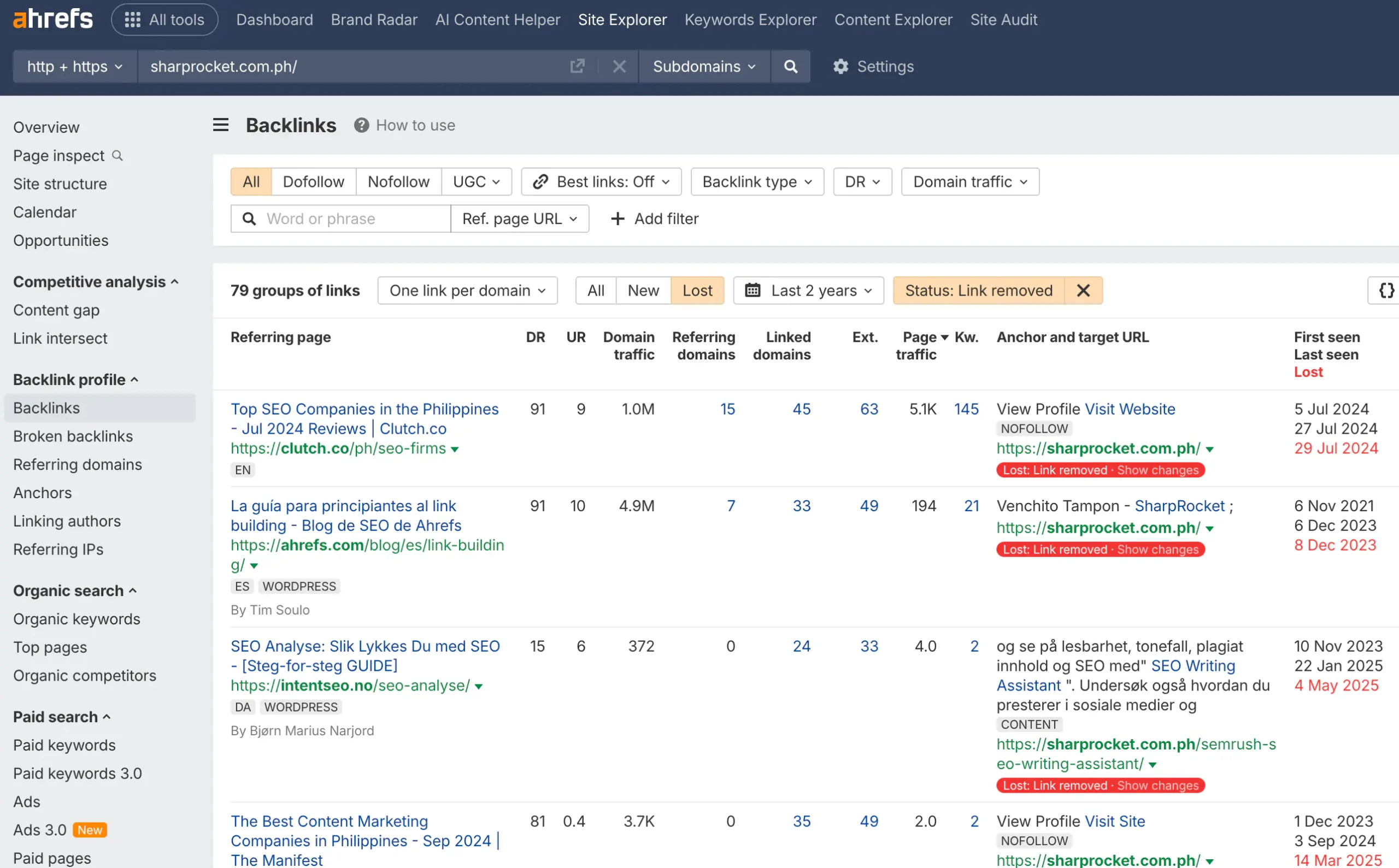
As you apply any of the steps above, it’s important to track whether the links return. Simply use Ahrefs and go to the Lost Backlinks report to check if any of the recovered pages have regained links.
If you’ve been receiving notifications in your email from Ahrefs, it would make the task easier, as you can quickly monitor these new links (from recovered ones).
Top Reasons Why Backlinks Are Lost
I assume you know this, but in case you don’t, here are some reasons why backlinks get lost.
- Your page returns a 404.
- The linking or referring page was deleted.
- The referring page gets updated, and the link is removed.
- The domain that is linked to your website has expired.
- A CMS migration wiped out links
- Manual removal by editors or webmasters
- The redirect chain broke.
- The content is no longer relevant or up to date.
Analyzing Link Loss Clusters
Link loss can happen on purpose – as it also gives an upside in identifying clear patterns and creating an effective prioritization plan – by understanding why and where links get lost and where to focus most of your link recovery efforts.
If you’re handling a website with fewer than 1,000 pages, this won’t hurt much, but if you’re doing enterprise SEO campaigns, it’s critically important to make link-loss analysis systematic.
Group Lost Links
Cluster backlinks based on destination URL (the page being linked to on your site) so you can identify and assess vulnerable pages.
Then group by the linked content’s topic or content theme to see which topics are losing links compoundedly.
Group by domain type (i.e., forum, blog, gov, etc) of the referring page to pinpoint any unstable link sources.
Competitor Comparison
You can also analyze link loss as part of your competitor link analysis opportunity.
Use tools like Ahrefs to compare your site’s lost link patterns against key competitors. See if any of the loss is a website-specific issue or part of a broader industry-wide trend.
Editorial Link Loss Patterns
This is where your analysis truly comes in. You investigate referring pages and domains for common behaviors and look for any evidence of blogs or websites deleting pages that are effectively undertaking mass outbound link removal. From here, you can use these patterns as angles of opportunities to tailor your link reclamation outreach campaigns.
Recovery Priority Score
If you want to go even more systematic and more technical in your link loss analysis, there’s a framework – Restore Score, which is often used to prioritize lost link recovery efforts – so you can make sure you get the most out of your resources – bringing the highest potential ROI for your SEO initiatives.
Prioritization Criteria
The criteria are composed of the following high-impact essential factors:
- Domain Rating (DR) – basically, pages with higher DR must be prioritized – no doubt, as they drive more authority, directly to improve your site’s overall domain strength.
- Traffic value – are the links from the page driving significant value in terms of traffic (either referral traffic or the linking page has high organic traffic)?
- Topical relevance – it’s a must requirement for the referring page’s content to be topically relevant to your webpage – the one with the highest topical relevancy score must be on top of the list.
- Anchor text context: links with the most relevant anchor text should be prioritized first (balance branded and keyword-rich anchor texts here).
- URL Ranking Potential – start prioritizing recovering links to pages that are sitting outside of page one (i.e., position 11 to 20), so any recovered link authority can really provide the necessary push to the rankings of your linked page.
Now you can assign a prioritization percentage to each criterion (e.g., 20% for topical relevance, 30% for traffic value, 10% for anchor text context, and other percentages to other criteria, totaling 100%). Then rate each linking page (where the lost link is hosted) based on your set criteria.
Content Gap After Link Loss
Another critical step you can integrate into your priority score assessment is identifying the exact (if not the probable) reason for the loss.
Begin by checking for obsolescence, which means you see and investigate if the link was removed primarily because the content became outdated or inaccurate. Well, this indicates a content gap you can start analyzing and likely root in your site’s topical opportunities for your bottom-of-the-funnel content strategy.
Now, if the content itself is the root cause, you can’t succeed simply with outreach if you don’t desire to update or completely overhaul your page’s content, making it up-to-date and strongly valuable enough to address any content gap.
Final Thoughts
When you begin to understand that recovering lost backlinks is one of the micro, high-ROI activities you can take action on or schedule as part of your ongoing SEO campaign, it will allow you to strengthen your website’s backlink profile (even more than your competitors).
Given that you want to maximize and leverage every SEO opportunity, including the link loss that normally happens to every website.
Written By

Reviewed By

Sef Gojo Cruz
COO at SharpRocket, overseeing end-to-end operations, from crafting link building strategies to leading high-performing teams. Previously led SEO initiatives at Workhouse, a digital agency in Australia, and Keymedia, a real estate media company based in New Zealand.